
NightWin Account: Registration, Login, Password Recovery and KYC Verification
This page covers the complete account lifecycle at NightWin Casino: opening an account, logging in, recovering access when something goes wrong, completing identity verification, managing the security of an active account, and closing it when needed. Each of these topics is treated separately, since the questions players ask about registration are different from the ones that surface three months into using the platform.
NightWin's account structure is not unusual by licensed-casino standards: registration takes a few minutes, login supports three credential types, KYC is required before the first withdrawal rather than at sign-up, and responsible gambling tools are available through account settings. The details of each step are set out below, drawing on the platform's published materials and confirmed from screenshots of the registration flow where UI specifics are involved.
One practical note before starting: the welcome bonus selection happens during registration, not after. The available packages - casino, VIP casino, crypto and sports - are presented on the bonus selection screen as part of the sign-up flow, and the choice made at that point is permanent. Players who have not yet reviewed the choose your NightWin welcome bonus options should do so before completing registration.
NightWin Account Reference: Key Parameters at a Glance
| Parameter | Value |
|---|---|
| Minimum age | 18 (standard for Curacao-licensed casinos; not explicitly published) |
| Registration fields | Email address or phone number (+44), password, name, personal details |
| Currency at registration | GBP (selectable) |
| Login methods | Email address, phone number (+44), username |
| Promo code field at registration | Yes - on the bonus selection screen |
| Social login (Google/Facebook) | Not confirmed in registration screenshots |
| Two-factor authentication | Not documented; not confirmed available |
| KYC documents required | Government-issued ID, proof of address, payment method confirmation |
| KYC trigger | Before first withdrawal (not required at registration) |
| Self-exclusion contact | [email protected] |
| Inactive account threshold | 12 months |
| Account closure | Available on request via support |
| Base currency | GBP |
Creating a NightWin Casino Account: the Full Registration Process
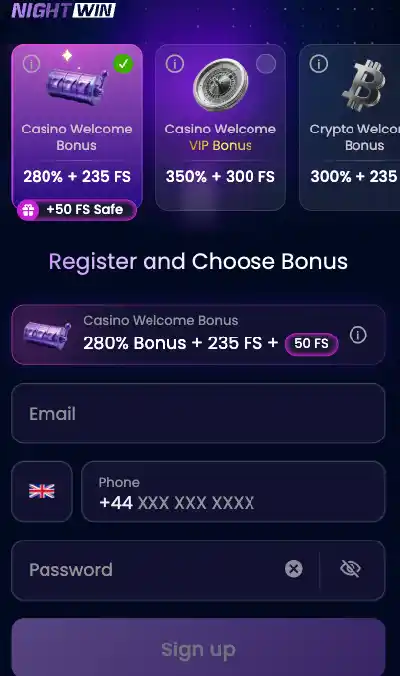
Registering at NightWin takes between two and five minutes under normal conditions. The form collects an email address or phone number, a password, and standard personal details. After account details are submitted, the platform moves to a bonus selection screen before the first deposit. The entire flow runs within the browser - no download is required for registration, and the same process applies whether you are on desktop, the Android APK or the iOS Safari shortcut.
Note: The promo code field appears on the bonus selection screen, not the initial account details form. If you have a code, have it ready before reaching that screen - entering it later is not possible once registration is complete.
What personal information does NightWin ask for during sign-up?
The NightWin registration form requires an email address or phone number with a UK +44 prefix, a password for the new account, and standard personal identification details including name. Currency selection is part of the flow, and UK players select GBP. Screenshots of the registration screen confirm these fields. There is no social login option visible in the registration interface - no Google, Facebook or Apple ID sign-in button - meaning credential creation through the form is the only route.
The form does not require payment details at registration; those are entered separately in the cashier when making a first deposit. KYC documents are also not collected at this stage.
Choosing your NightWin welcome bonus during the registration flow
After the account details form is submitted, a bonus selection screen presents the available welcome packages: Casino Welcome Pack (280% + 235 FS + 50 safe spins), VIP Welcome Pack (350% + 300 FS), Crypto Welcome Bonus (170% + 100 FS), Sports Welcome Bonus (150% + £10 free bet), plus options to enter a promo code or proceed without a bonus. Selecting one of the packages locks in that choice for the account; there is no post-registration mechanism to switch between welcome offers.
The "Claim Bonus Later" and "Just Play" options on this screen are for players who want to defer the decision or bypass welcome bonuses entirely. Both are valid selections. A player who is undecided at registration is better served by choosing "Claim Bonus Later" than by selecting a package they have not researched, since the wagering consequences of the wrong choice are not trivially reversed.
NightWin Promo Code at Registration: How to Apply a Bonus Code
NightWin supports promotional codes entered at the bonus selection screen during registration. The field is labelled "Promocode / Special Offer" and sits alongside the four welcome package options. Codes are typically distributed through the NightWin Telegram channel, affiliate partner sites and email marketing campaigns targeting players who have previously shown interest in the platform.
Where does the NightWin promo code field appear during registration?
The promo code field is on the bonus selection screen - the second major step in the registration flow, appearing after the account details form has been submitted. It does not appear on the initial form page and is not accessible through account settings or the cashier after registration is complete. A player who reaches the bonus selection screen, overlooks the promo code field, and proceeds without entering a code cannot subsequently apply the code to their account.
Can I apply a NightWin bonus code after completing registration?
No. The promo code field is only available during the registration flow, specifically on the bonus selection screen. Once that screen has been passed and the account is active, the code cannot be entered through any other route - not through the cashier, promotions page or account settings. Players who receive a code after registering should contact support to inquire whether an equivalent offer can be applied manually, though this is at the operator's discretion and is not a guaranteed process.
How do you Log In to NightWin Casino?
The NightWin login button sits at the top right of the homepage, visible on desktop and in the top navigation of the mobile browser interface. After tapping or clicking it, the login form presents three credential options: email address, phone number or username. Each requires the associated password set at registration. The system processes the login request quickly under normal conditions; failed attempts or security flags may extend the authentication process.
There is no separate login system for mobile - the same credentials and process apply whether the player is using the Android APK, the Safari shortcut or the desktop browser.
NightWin login credential options: which method should you use?
All three login methods - email, phone (+44) and username - provide equivalent access to the full account. The practical differences are minor: email login is the most common convention and the most widely remembered; phone number login uses the +44 prefix entered at registration; username is a third option if neither the email nor phone is accessible at the time of login. Using the same method consistently avoids the occasional confusion that arises from trying to log in with the wrong credential type.
For players accessing NightWin from mobile, touch keyboard entry is the relevant variable: email addresses with complex domains can be error-prone on small screens, while a username chosen to be short and simple may be more convenient.
Where is the NightWin login button, and how do you access it on mobile?
On desktop, the login button is positioned in the upper-right area of the page header, consistent with standard casino site navigation. On mobile - both in the Android APK and the iOS Safari shortcut - the button occupies the same top navigation area, scaled to touch dimensions. Tapping it opens the credential form as an overlay or separate screen depending on the device. The login process on mobile is functionally identical to desktop; there is no mobile-specific authentication step or additional PIN entry required for the standard login flow.
NightWin Login Problems: Troubleshooting a Blocked or Failing Login
Login failures at NightWin divide into three categories: wrong credentials, a temporarily blocked account, or a technical issue. The first is the most common and resolves through careful re-entry or password recovery. The second triggers automatically after repeated failed attempts and clears after a short wait or password reset. The third is rare and is best addressed by contacting live chat support.
Before contacting support about a failed login, verify that the credential type selected in the login form matches what was registered. Email, phone and username are treated as distinct credential types at NightWin - selecting "phone number" in the login form and entering an email address will fail even if the email is correctly typed. - practical recommendation
Why is my NightWin Casino login not working?
The most frequent causes of a failed login are: using a different credential type from the one registered (email versus phone versus username), typing errors including incorrect capitalisation in a case-sensitive field, using a password that was changed after the current attempt was formed, or attempting to log in to a different NightWin domain than the one where the account was created. Browsers that autofill credentials can introduce errors if the saved data is outdated.
A temporarily blocked account after multiple failed attempts is a security measure, not a permanent lock. Waiting a short period and retrying - or initiating password recovery immediately - resolves the block in most cases without requiring support contact.
What to do if your NightWin account is locked after failed login attempts
If repeated failed login attempts trigger a temporary block, the two routes to resolution are: using the password recovery function from the login screen, which bypasses the block by resetting the credential; or contacting NightWin live chat, which operates 24/7 with a response time of 1-3 minutes. Live chat agents can verify account identity and assist with login restoration when self-service recovery is not working.
Do not attempt the same failed login repeatedly during a block period. Each additional failed attempt during a block can extend the lockout rather than clearing it.
NightWin Forgot Password: How to Recover Your Account Access
Password recovery at NightWin is available from the login screen and routes through either email or the registered phone number. The process is the same on mobile and desktop. Recovery requires access to the email address or phone number associated with the account at the time of registration - if neither is accessible, contacting support via live chat or email ([email protected]) is the next step.
How do you recover a NightWin password via email?
From the login screen, select the password recovery option. Enter the email address registered on the account. NightWin sends a password reset link to that address. Open the email, follow the reset link, enter a new password in the form provided, and confirm it. The new password takes effect immediately and can be used to log in through the standard credential entry.
The recovery email is sent to the registered address only. If the email address itself has been changed or is no longer accessible, this route will not deliver the reset link - support contact is necessary in that scenario.
How do you recover a NightWin account password using a phone SMS code?
From the password recovery screen, select the phone number option rather than email. Enter the registered +44 phone number. NightWin sends an SMS code to that number. Enter the code in the verification field on the recovery screen, then create and confirm a new password when prompted.
SMS recovery is the more practical option for players who access NightWin primarily through the mobile app and have their phone immediately to hand, since it avoids the need to switch to an email application.
NightWin KYC Verification: Identity Documents and Process
Identity verification at NightWin is a prerequisite for withdrawals, not for account creation or play. A player can register, deposit, use a welcome bonus and play games without submitting any documents. The trigger is the first withdrawal request: at that point, NightWin requires verification to be completed before funds are released.
The advantage of this structure is that players can assess the platform before committing to the full verification process. The practical implication for KYC verification before withdrawal planning is that submitting documents proactively - before placing a withdrawal request - avoids a queue delay between winning and receiving funds.
What documents are accepted for NightWin identity verification?
NightWin's verification process covers three document categories. Identity is established through a government-issued document: a passport, national identity card or driving licence. Address is confirmed through a document linking the applicant's name to a physical address, typically a utility bill or bank statement no more than three months old. Payment method ownership is confirmed through evidence of the deposit method used on the account - for cards, a scan or photograph of the card face with the middle eight digits obscured.
All three must be submitted before the first withdrawal is approved. Documents are uploaded through the verification section within the player's account area. Partial submissions - only one or two documents - leave the account in a pending state until all required items are received.
When does NightWin ask for identity verification - before or after withdrawal?
KYC is triggered before the first withdrawal, not at registration. Players are not asked for documents when creating the account or when making a deposit. The request surfaces when a withdrawal is initiated: the platform prompts for verification before the payment is processed. Once verification is approved, subsequent withdrawals proceed without repeating the process, provided no material account changes have occurred.
This is standard practice for Curacao-licensed operators, and it is consistent across NightWin's documented terms. A player who expects to withdraw within the first session should plan for the verification step to add time to the payout cycle, or complete the submission as part of the account setup rather than waiting for the withdrawal prompt.
NightWin Account Security: How the Platform Protects Player Access
Account security at NightWin operates at the infrastructure level through 256-bit SSL encryption, and at the account level through session monitoring and unusual activity detection. Two-factor authentication is not documented on the platform and cannot be confirmed as available based on published materials.
The absence of documented 2FA at NightWin places more responsibility on the player's own credential hygiene. A password that is unique to NightWin - not reused from another site - and is not stored in an unprotected location reduces the main accessible risk to the account. The SSL layer protects the transmission; the password protects the account against credential exposure from other sources.
How does NightWin protect your account with 256-bit SSL encryption?
SSL encryption at 256-bit strength secures all data transmitted between a player's device and NightWin's servers. This applies to login credential submission, account detail exchanges, payment transactions and any other data exchange with the platform. The encryption makes intercepted data unreadable to any third party capturing network traffic. For players accessing NightWin through public Wi-Fi, the SSL layer provides meaningful protection against passive interception, though using a private network for financial transactions remains the more conservative practice.
The SSL certificate applies to all pages of the platform, not only the login and cashier sections.
What triggers a security check or additional confirmation at NightWin?
NightWin's session monitoring tracks patterns that differ from an account's established behaviour: logins from locations or devices significantly different from the usual pattern, rapid successive failed login attempts, and activity that resembles automated rather than human interaction. When these patterns are detected, the platform may request additional confirmation before granting access or processing a transaction. The specific thresholds and confirmation types are not published, which is standard practice since publishing them would assist attempts to bypass the detection.
Players who access NightWin from multiple locations - different cities, work and home networks - may encounter occasional security prompts as the system calibrates to their usage pattern. These are routine rather than indicative of a breach.
NightWin Responsible Gambling: Deposit Limits and Self-Exclusion
NightWin provides two principal responsible gambling tools: deposit limits and self-exclusion. Both are accessible through the account settings and managed directly by the player. These tools are available under the Curacao licence framework rather than the UKGC's mandated responsible gambling standards, which means the implementation may differ from what players accustomed to UKGC-regulated operators would expect.
How do you set deposit limits on your NightWin Casino account?
Deposit limits are set through the account settings section, where players define daily, weekly or monthly thresholds beyond which the cashier will decline additional deposits. Once a limit is set, it cannot be increased immediately - a cooling-off period applies to any increase request to prevent impulsive changes during a session. Reducing a limit takes effect immediately.
The limit function covers deposits only; it does not govern bet sizes or time spent on the platform. Players who want more granular controls should contact support to discuss what additional options may be available.
What should I use deposit limits for? Deposit limits are most effective as a pre-commitment tool - setting them during a calm period before a session, rather than attempting to add them after a run of losses. A limit set at a level that reflects your planned spend for the week removes the moment-of-impulse decision from the deposit process entirely.
NightWin self-exclusion: how to take a break or close your account temporarily
Self-exclusion at NightWin is requested by emailing [email protected] with the account username or registered email address, specifying the exclusion period. The platform offers exclusion periods of up to 12 months. During exclusion, access to the account and the website is suspended; deposits, bets and withdrawals cannot be initiated while the exclusion is active.
Once an exclusion period begins, it cannot be reversed before the stated end date. NightWin's terms confirm this: accounts under an active self-exclusion policy are not subject to early reopening regardless of the circumstances stated in a reinstatement request. After the exclusion period expires, the player may contact [email protected] to request account reactivation.
How do you Close or Delete a NightWin Casino Account?
Account closure at NightWin is initiated by contacting support, either via live chat or email. The platform does not provide a self-service account deletion button accessible without support contact. When a closure is processed, any remaining balance is returned to the player through the registered payment method, net of any applicable withdrawal charges. Active bonuses are cancelled on account closure and are not paid out.
What happens to your balance when you close a NightWin account?
Any positive account balance at the time of closure is returned via the player's registered payment method, subject to the standard withdrawal processing rules: the same-method requirement, the 24-hour wait from the first deposit (if not already elapsed), and standard processing timelines. The platform reserves the right to establish a minimum withdrawal amount for the final balance payment. Bonus funds that have not been cleared through wagering requirements are forfeit on closure.
Players closing an account to stop gambling should use the self-exclusion route rather than a standard closure, since self-exclusion prevents reopening the account during the specified period, while a standard account closure can be reversed at the operator's discretion.
NightWin inactive account policy: fees after 12 months of dormancy
An account that records no deposits, bets or withdrawals for 12 consecutive months is classified as dormant. From the 30th day after dormancy classification, NightWin deducts a monthly administrative fee from the account balance. If the balance reaches zero, no further fees are charged. If the balance is depleted entirely before 12 consecutive dormant months have elapsed, the account may be closed by the operator.
To reactivate a dormant account before all funds are exhausted, the player makes a deposit, places a bet or requests a withdrawal from the account. Any active bonus campaigns credited to the account are cancelled at the point of dormancy classification, whether or not the balance remains.
When Account Management at NightWin Creates Friction
Three account management limitations are worth naming clearly. First, the absence of documented 2FA means account security relies entirely on the password and the platform's own session monitoring. Players with accounts on multiple online platforms who use password managers should ensure the NightWin credential is distinct and not linked to any compromised password from another service.
Second, self-exclusion requires email contact rather than being available as a one-click in-account control. A player who wants to exclude themselves during an active session needs to exit the platform, draft and send an email, and wait for confirmation - a process that takes longer than an immediate dashboard toggle. The email process is documented; it works. But the friction in a high-stress moment is higher than a one-tap option would provide.
Third, promo code application is strictly a registration-time function. Players who discover an active promo code after signing up have no self-service route to redeem it. Support contact is the only option, and whether the code is honoured retroactively is at the operator's discretion.
The NightWin Account in Practice
NightWin's account setup covers the necessary functions - registration, login, recovery, verification and responsible gambling tools - with processes that match standard licensed-casino practice. The registration flow is concise, the three-credential login is flexible, and the KYC requirement triggering at withdrawal rather than sign-up allows players to evaluate the platform before committing documents.
The gaps are the absence of confirmed 2FA, the email-dependent self-exclusion route, and the one-chance-only promo code window at registration. None of these is unusual in the Curacao-licensed market, but all three represent areas where NightWin's account management lags behind what UKGC-regulated operators are required to provide.
For the full context of the platform's licensing, payment setup and game library, the NightWin Casino overview and licence page covers the elements that sit outside the account management scope.